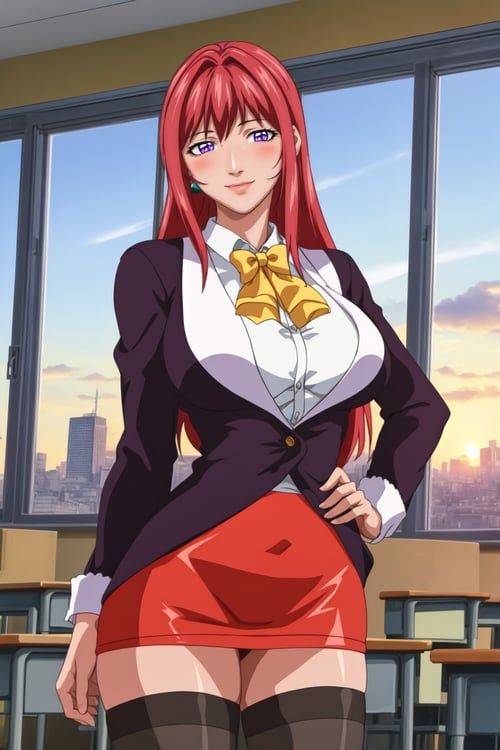
Hiroko Takashiro (Hentai: Bible Black) Pony / 1.5 - 2.0 SD1.5

Hiroko Takashiro (Hentai: Bible Black) Pony / 1.5

LORA
Original


Updated:

Hiroko Takashiro (Hentai: Bible Black) Pony / 1.5 by Enigmata on Tensor.Art

Your favorite teacher Takashiro Hiroko is on PonyXL and SD1.5 animefull now!

PonyXL tags:

Takashiro Hiroko, 1girl, mature female, purple eyes, long hair, red hair, earrings, teacher, blouse, bowtie, blazer, taut skirt, red skirt, black thighhighs, garter straps, high heels

curvy, large breasts, thighs,

SD1.5 tags:

Version 2:

TakashiroHiroko, 1girl, mature female, purple eyes, long hair, red hair, earrings, jewelry, teacher, blouse, bowtie, blazer, pencil skirt, thighhighs, high heels

Version 1: Hiroko Takashiro, mature female, milf, teacher, red hair, long hair, lipstick, makeup, purple eyes, perfect eyes, earrings, jewelry, Large Breasts, Cleavage, big ass, thighs

Teacher's clothes: shirt, jacket, black thighhighs, garter belt, zettai ryouiki, pencil skirt, school uniform, highheels

PonyDiffusion v6 (XL) quality settings:

Style settings for PonyXL (important):

score_9, score_8_up, score_7_up, score_6_up, uncensored, BREAK

Negative prompt for PonyXL (recommended):

dutch angle, censored, watermark, jpeg artifacts, muscular female

SD1.5 quality settings:

masterpiece, high quality

in negative: (worst quality, low quality:1.2)

Hires fix and adetailer settings (for 1.5 and Pony)

Hires.fix: Upscaler foolhardy_remacri (download and put in "ESRGAN" folder in "models" if you are using automatic1111 or forge).

Hires steps: 16-18

Denoising strength: 0.3

Adetailer: denoising strength 0.3. Detection model confident threshhold: 0.7-0.8.

Best sampling method is euler a, 25-40 sampling steps. You don't need any DPM++.

I will be glad to receive feedback from you and a demonstration of your art with my LoRA!

Other works.rt with my LoRA!

Version Detail

SD 1.5
4600
18
Version 2 is released! Better training settings, lower filesize, better tagging. Today I present you Hiroko Takashiro (teacher) from "Bible Black" again! La noche de Walpurgis version. 0.85 - 1 strength of Lora is the best radius (For combining with other LoRAs, I recommend reducing weight). Clip skip 2 Some necessary tokens for better experience: Version 2: Main tokens: TakashiroHiroko, 1girl, mature female, purple eyes, long hair, red hair, earrings, jewelry, teacher, blouse, bowtie, blazer, pencil skirt, thighhighs, Also you can use another prompt for clothes and hairstyles :3 Version 1 tags: Hiroko Takashiro, mature female, milf, teacher, red hair, long hair, lipstick, makeup, purple eyes, perfect eyes, earrings, jewelry, Large Breasts, Cleavage, big ass, thighs Teacher's clothes: shirt, jacket, black thighhighs, garter belt, zettai ryouiki, pencil skirt, school uniform, highheels Main advices for all LoRAs: I recommend you next prompt order for NAI-based mixes (you can see it in my preview arts): (high quality:1.2) ("masterpiece" and "8K" kill some concepts. Be careful if you try some complex clothes or concepts.) Also put lighting / shadows, intricate details if you need some extra effects. Sometimes it doesn't work if style of anime or game was baked in LoRA or anime checkpoint mixes lost some concepts which exists in vanilla SD 1.5. Activation word (from lora civitai page, usually character name). Describe with danbooru tags character activity, expressions, camera position. Hair details, face details, jewelry, crowns, hats, etc. Clothes and shoes; Or nude. Body details (large breasts, cleavage). Genitals if you want to generate it. Background. Advices for upscaling / fixing: use highres.fix (If you are sure that your prompt is easy for SD); I prefer x4_Fatal_anime_500000_G, animesharp, foolhardy_remacri, siax with 1.5x - 2x upscale. 0.36 denoising and 15-18 Hires fix is enough. Do not use "latent" upscaler because it works worse with denoisning < 0.5 but you don't want so high denoising stength because it changes your image instead of adding details. use extention after detailer for better faces. It is better than inpaint. use SD Upscale / Ultimate SD Upscale script in img2img after highres fix if you want 4K or more resolution with adding details (don't use Extras for it). Use inpaint and sketch for other details; Use Photoshop / Photopea extension for fixing hands, textures and other. I will be glad to receive feedback from you and a demonstration of your art with my LoRA!

Project Permissions

    Use Permissions

  • Use in TENSOR Online

  • As a online training base model on TENSOR

  • Use without crediting me

  • Share merges of this model

  • Use different permissions on merges

    Commercial Use

  • Sell generated contents

  • Use on generation services

  • Sell this model or merges

Related Posts