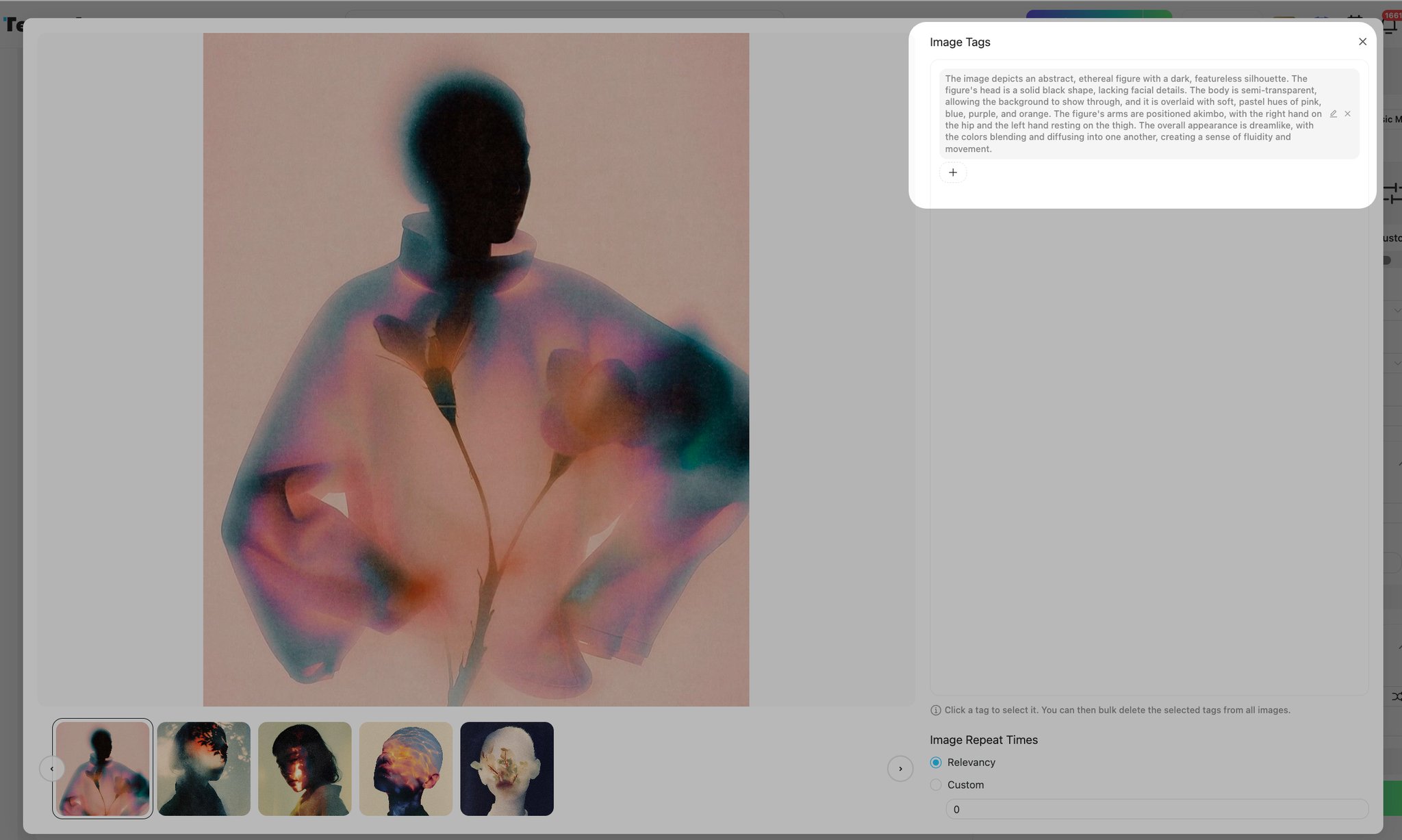
<p>We bring you some recent updates on TA that you might find interesting. </p><h2 id="heading-2-cfPYgXVqXu">HunyuanImage 2.1 Update</h2><p>Following Tencent’s official update of Hunyuan 2.1, which introduced ComfyUI support, TA has now synchronized its system to support this update as well.</p><p>Hunyuan 2.1 has : </p><ul><li><p><strong>Enhanced Semantic Understanding</strong>: Now capable of accurately interpreting complex semantics, supporting individual descriptions and precise generation for multiple subjects.</p></li><li><p><strong>Improved Visual Quality</strong>: Visual textures are more realistic, with enhanced details and significant improvements in lighting and material expression.</p></li><li><p><strong>Faster and More Stable Performance</strong>: Response and generation speeds are now more consistent, meeting a wider range of business scenario demands.</p></li></ul><img src="https://image.tensorartassets.com/article/596591019210834840/8823c535-e5db-43fa-b7d3-ac918fc10978.png"><p>📣 <strong>We now supports native 2K resolution output!</strong> Don’t miss out.</p><p><strong>Try it here</strong>: <a target="_blank" rel="noopener noreferrer nofollow" href="https://tensor.art/models/908972930887615947">https://tensor.art/models/908972930887615947</a></p><p></p><h2 id="heading-2-EGie0JFTZX">SRPO Support</h2><p>SRPO is introduced to address the "oily" texture issue in the Flux model. Compared to previous Flux models, SRPO offers the following advantages: </p><ul><li><p><strong>Oiliness Reduction</strong>: Effectively eliminates oiliness and AI-generated artifacts, enhancing realism by up to 3x. </p></li><li><p><strong>Fast Training</strong>: The training process now takes only 10 minutes.</p></li></ul><img src="https://image.tensorartassets.com/article/596591019210834840/d9aada79-0cae-45ca-ae4c-66d10882ae40.png"><p><strong>Experience here:</strong> <a target="_blank" rel="noopener noreferrer nofollow" href="https://tensor.art/models/908661281618175817">https://tensor.art/models/908661281618175817</a></p><p></p><h2 id="heading-2-rQDX7BASes"><strong>Vace Supported</strong></h2><p>We previously launched the video Vace feature, but recently with help of <strong>Wan 2.2 VACE</strong>, we've upgraded it to make it even more powerful.</p><p>VACE provide <strong>Precise Motion Rendering</strong>: Accurately recreates action changes and facial expressions.</p><p><strong>Simple Setup</strong>: Just go to the Video Workspace, select <strong>Edit</strong> as the model type, choose the <strong>Wan 2.2</strong> model family, and select <strong>Wan 2.2 Vace</strong>. </p><img src="https://image.tensorartassets.com/article/596591019210834840/40f9bd12-5a1c-4f06-8db5-b6815d08141a.png"><p><strong>Easy Upload and Generation</strong>: Upload your materials and hit <strong>Generate</strong> to create videos.</p><p>Multiple Function includes <span style="color: rgb(255, 167, 39)"><strong>depth control, pose control, swap subject, multi-image-reference and Recolorization</strong></span>. Offers comprehensive video editing tools, precise control, and endless creative possibilities.</p><img src="https://image.tensorartassets.com/article/596591019210834840/b838f37e-06d7-4ba4-ba9a-121d405aca29.png"><h2 id="heading-2-ahLrMha1kh">New Labeling Algorithm</h2><p>The new <strong>Minicpmv4.5 series</strong> labeling algorithm is now available for online training. Compared to previous versions, this algorithm offers significant improvements:</p><ul><li><p><strong>Better Understanding of Images/Videos</strong>: Now captures more subtle details and semantics with greater precision.</p></li><li><p><strong>Natural and Fluent Tagging</strong>: Generates labels that are more aligned with human expression.</p></li></ul><p>Check it out below:</p><ol><li><p>Enter the online training mode, upload your image, and select <strong>Labeling</strong> → <strong>Auto Labeling</strong>.</p><img src="https://image.tensorartassets.com/article/596591019210834840/96f68e46-a36a-4399-b58a-487f9693901f.png"></li><li><p>Choose the <strong>Minicpmv4.5 series</strong> from the dropdown menu.</p><img src="https://image.tensorartassets.com/article/596591019210834840/b987fd3a-ffd9-4ffb-beb8-6658013c451b.png"></li><li><p>Preview the results.</p><img src="https://image.tensorartassets.com/article/596591019210834840/df6a76b2-3421-47c7-b260-5b89b9523b29.png"></li></ol><p></p><h2 id="heading-2-ZEMuDkxxgj">Enhanced Prompt Upgrades</h2><p>To help improve the quality and stability of generated content, we has upgraded the prompt enhancement feature.</p><ul><li><p><strong>Optimized Prompt Formula</strong>: The generated prompt text now follows a formula of <strong>[Subject Description] + [Environmental Background] + [Style Tone] + [Aesthetic Parameters] + [Emotional Atmosphere] + [On-screen Text]</strong>, ensuring detailed, accurate expression.</p></li></ul><p>Simply go to the workspace, input your core keywords, and click the <strong>Prompt Enhancement</strong> icon to generate a complete prompt in one click—no more struggling with unclear or lackluster descriptions! </p><img src="https://image.tensorartassets.com/article/596591019210834840/f5a8fad2-180b-4b3c-8535-53f8e1d74184.png"><p><span style="color: rgb(36, 41, 47)">👇👇👇</span></p><img src="https://image.tensorartassets.com/article/596591019210834840/cfd0669a-a4e2-40fa-8527-639cfd9ba437.png"><hr><p>Thank you for reading through the update! If you have any questions or suggestions, feel free to join our community and reach out to the admins for feedback on Discord. </p><p></p><p></p>
The image has no generation data